See your work, not your commits.
Gitnetix is a Git client with no commit graph. Branches as a tree. Releases as a button. An agent on every branch.
v0.7.1 · Free for macOS, Windows and Linux · Other platforms
Heads up: this web demo is very limited and a bit clunkier than the real app. Not every button works.
NO COMMIT GRAPH
Git without the subway map.
Every other Git client draws what git stored: colored rails, crossing merges, hundreds of dots. Gitnetix draws what you are working on.
A TREE OF INTENT
It works out where every branch belongs.
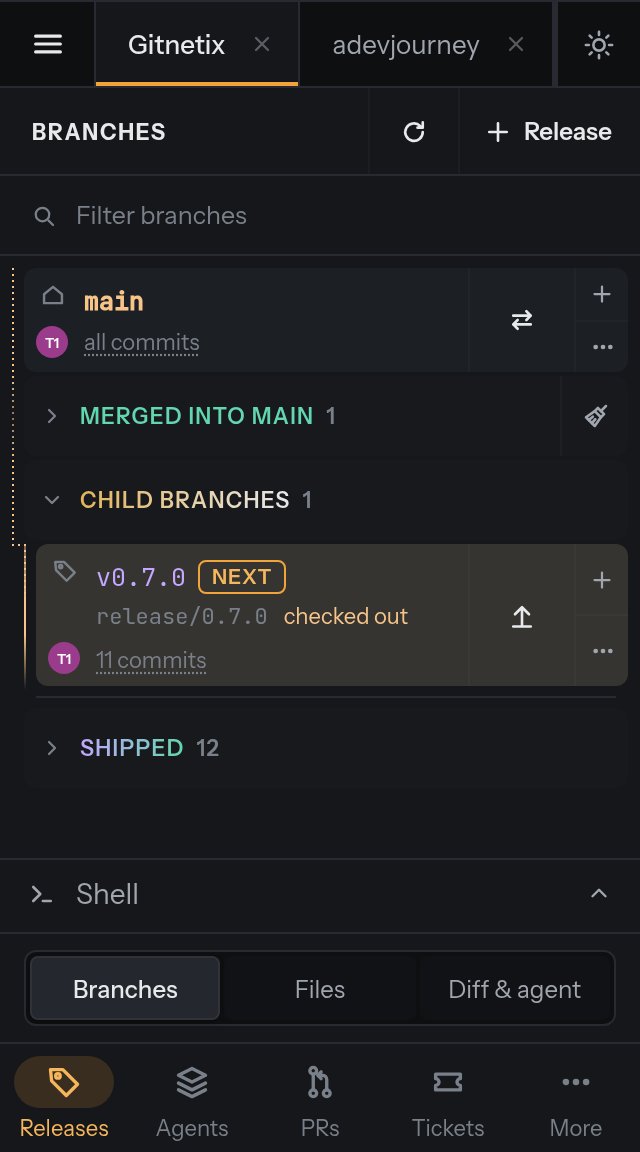
Gitnetix finds each branch's real parent on its own: the base you declared, a merge commit, a pull request on GitHub or Azure DevOps, a squash that carries it, or the closest history. Even squash-merged PRs land under the right release.
The orange path
Where you are, and what this merges into. A soft pulse travels from
mainto your checkout.Ahead and behind, for real
Counted against the branch's real parent, not just origin. WIP, conflicts and rewritten history sit on the same row, in the same order.
Merged moves aside
Done work folds into a Merged group under its parent. Branches whose ticket key shows up in a later squash get a "likely merged" tag and are never auto-deleted.
Falling behind
Branches 25 or more commits behind are gathered in one place. Pick the ones to delete and clean up in one click.
Shipped, with its tag
Past releases sit below a separator with their version. Delete a tag and the release reopens.
RELEASE-CENTRIC
Cut. Build. Ship.
Other clients hand you raw git verbs. Gitnetix gives you the release flow your team already runs, as buttons.
Cut a release
release/2.4.0frommain, or from the last tag for a hotfix. The next version is suggested from your changes.Branch work
Features and fixes off the release, each in its own worktree if you like.
Agents help
Claude Code, Codex, Gemini work in parallel. AI adds each branch to the changelog and writes the PR.
Ship
Dates the changelog, fast-forwards
main, tagsv2.4.0, pushes. One click.
release/2.4.0 → CHANGELOG [2.4.0] - 2026-10-22 → main → v2.4.0
PARALLEL WORKSTATIONS
One branch. One worktree. One agent.
Open any branch in its own worktree with one click, put an AI agent on it, and keep a shell beside it. Run them side by side. When you close a worktree, Gitnetix can merge it into the branch you choose.
Every action is also an MCP tool, so another agent can drive Gitnetix too: claude mcp add gitnetix
REMOTE
Your desktop, in your pocket.
Scan the QR code from your desktop and the same app opens in your phone's browser. Approve agents, ship hotfixes, review PRs.
TEMPLATES + MODEL ROUTING
AI writes the boring text.
Editable templates decide what gets written. Per-task routing decides who writes it: a cheap model for commit messages, a strong one for conflicts. Works with a signed-in CLI or an API key.
Fits your stack.
PULL REQUESTS
List, review, comment, reply, resolve, merge and close, without leaving the tree.
TICKETS
Branches matched to tickets by key, mine and sprint filters, status changes from the detail pane.
PLATFORMS
A phone or any browser pairs with your desktop to manage it remotely.
BUILT IN PUBLIC
21 releases in 9 days.
From the first release on October 17, 2026 to v0.7.1 on October 25, 2026. Every release is cut, dated and tagged the way Gitnetix ships: Unreleased, then one click.
- v0.4.0
Close a worktree, keep the work
Merge on close · Shell beside every agent · Azure DevOps pull requests · Jira sign-in with Atlassian · Auto fetch every 5 min
- v0.3.0
Pick your agent, per session
Provider, model and effort per session · Commit search · Author filters · Faster tree updates
- v0.2.0
Right-click everything
Context menus · Folder totals · Rebase on retarget
UNDER THE HOOD
Small, fast, native. And it's real git.
A Rust engine wraps the git CLI you already trust. Branch views are cached per project and only changed branches are rebuilt. Origin is fetched and pruned every five minutes.
- Rust
- Engine on the real git CLI
- Tauri 2
- Native shell, small download
- React
- One UI for desktop, phone and browser
- Keychain
- API keys and tokens in your OS keychain
- MCP
- Every RPC method exposed as a tool
- Auto-update
- New releases offered on launch
- Calm motion
- Fluid by default, every animation can be turned off
- Dark & light
- Follows your system, or pick one
Questions, answered.
What is Gitnetix?
Gitnetix is a release-centric Git client for macOS, Windows and Linux. Instead of a commit graph, it shows your branches as a tree: main, then releases, then the features and fixes that belong to them. It ships a release in one click and can run an AI agent on every branch.
Is Gitnetix free?
Yes. Gitnetix is free to download and use on macOS, Windows and Linux, and updates itself. AI features run through your own signed-in CLI (Claude Code, Codex, Gemini, Copilot) or an API key, so any AI cost goes to your provider, and local models through Ollama cost nothing.
How is it different from other Git GUIs?
Most Git clients are built around the commit graph, which shows what git stored. Gitnetix drops it and shows intent: which release a branch belongs to, what is still open, what shipped and what is falling behind. It works out each branch's real parent, even after a squash-merged pull request.
Is Gitnetix an alternative to GitKraken, Fork or Sourcetree?
Yes. Like GitKraken, Fork, Sourcetree, Tower or GitHub Desktop, it is a desktop Git GUI for everyday branching, committing, merging and pull requests. The difference is the picture: those clients are built around the commit graph, while Gitnetix shows branches as a tree of releases and the work inside them, with a one-click release flow and an AI agent per branch.
Which AI agents does it work with?
Claude Code, Codex, Gemini, Copilot and Ollama through their signed-in CLIs, or any provider with an API key. You pick the provider, model and effort for each agent session, and each one runs in its branch's own worktree.
Does it support GitLab or Bitbucket?
Not yet. Any git remote works for branches, commits and releases. Pull request features currently cover GitHub and Azure DevOps.
macOS says Gitnetix "is damaged". Is it safe?
The app is fine. It isn't notarized yet, so macOS can't check who made it. After moving it to Applications, run xattr -cr /Applications/Gitnetix.app once. If that says "Permission denied", copy it to ~/Applications and clear the flag there (commands on the Download page). Or choose Open Anyway in System Settings › Privacy & Security. Updates from inside the app don't need this again.
Can I manage it from my phone?
Yes. Scan the QR code shown by your desktop (or a headless server) and Gitnetix opens in your phone's browser, no app store needed. From there you can drive releases, agents, worktrees, pull requests and tickets.
Stop reading the subway map.
Free download for macOS, Windows and Linux.